

















Build Your Own Tank Robot with 3D-Printed Tracks
We’ll build a small tank robot with tracks, powered by Arduino. Students will 3D-print the parts, assemble the tank chassis, add motors and an Arduino board, and finally write code to drive it.
This project combines mechanical assembly, electronics, and coding — perfect for teamwork in schools.
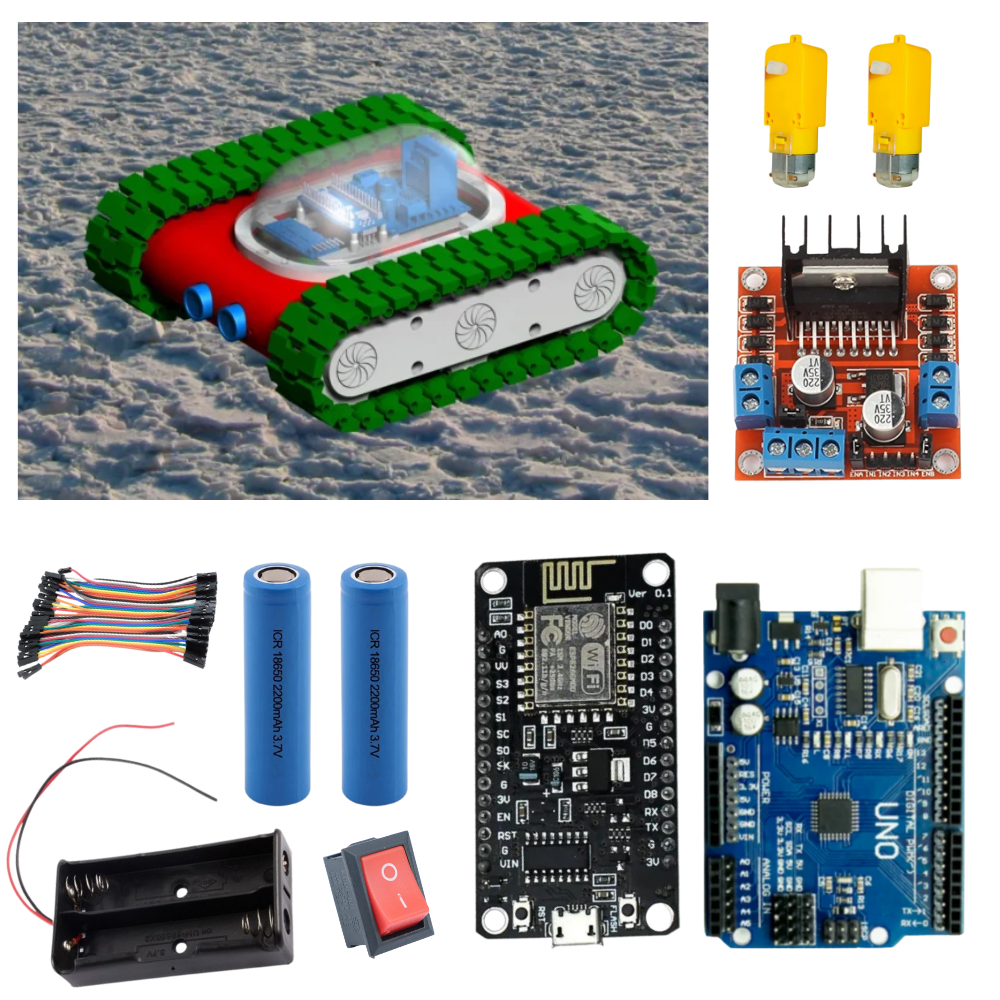

🛠️ Materials Needed
3D-Printed Parts (tank base, wheels, tracks – from the provided design file)
Arduino UNO (or compatible board)
L298N Motor Driver Module
2 × DC Motors with Gearbox (12V or 6V small DC geared motors)
Battery Pack (7.4V Li-ion or 9V battery with holder)
Jumper wires, screws, and nuts
Breadboard (optional for testing)
Switch (to turn power ON/OFF)
🏗️ Step 1: 3D Print the Parts
Print the base chassis.
Print wheels and tracks. Make sure track segments fit together smoothly.
Sand edges if needed to reduce friction.
👉 Tip: Use PLA or PETG filament at 0.2mm layer height for strong parts.
🔧 Step 2: Assemble the Tank
Attach the DC motors to the chassis.
Mount the wheels on the motor shafts.
Fit the idler wheels (free rotating) to guide the track.
Connect all track links around wheels to form a full loop.
Secure the battery holder on the chassis.
⚡ Step 3: Wire the Electronics
Connect motors to L298N Motor Driver.
Connect L298N IN1, IN2, IN3, IN4 to Arduino digital pins.
Connect +12V and GND from battery to L298N.
Connect 5V from Arduino to L298N ENA/ENB pins.
Wiring Example:
Motor A → OUT1, OUT2
Motor B → OUT3, OUT4
Arduino D9 → IN1
Arduino D8 → IN2
Arduino D7 → IN3
Arduino D6 → IN4
💻 Step 4: Arduino Code
// ————————————————————
// Tank Robot Basic Movement
// SmartXProKits – Student Edition
// ————————————————————
// Motor driver pins
int IN1 = 9; // Left motor forward
int IN2 = 8; // Left motor backward
int IN3 = 7; // Right motor forward
int IN4 = 6; // Right motor backward
// ————————————————————
// Setup
// ————————————————————
void setup() {
// Set all motor pins as output
pinMode(IN1, OUTPUT);
pinMode(IN2, OUTPUT);
pinMode(IN3, OUTPUT);
pinMode(IN4, OUTPUT);
}
// ————————————————————
// Movement Functions
// ————————————————————
// Move Forward
void forward() {
digitalWrite(IN1, HIGH); // Left motor forward
digitalWrite(IN2, LOW);
digitalWrite(IN3, HIGH); // Right motor forward
digitalWrite(IN4, LOW);
}
// Move Backward
void backward() {
digitalWrite(IN1, LOW);
digitalWrite(IN2, HIGH); // Left motor backward
digitalWrite(IN3, LOW);
digitalWrite(IN4, HIGH); // Right motor backward
}
// Turn Left
void left() {
digitalWrite(IN1, LOW);
digitalWrite(IN2, HIGH); // Left motor backward
digitalWrite(IN3, HIGH); // Right motor forward
digitalWrite(IN4, LOW);
}
// Turn Right
void right() {
digitalWrite(IN1, HIGH); // Left motor forward
digitalWrite(IN2, LOW);
digitalWrite(IN3, LOW);
digitalWrite(IN4, HIGH); // Right motor backward
}
// Stop Robot
void stopRobot() {
digitalWrite(IN1, LOW);
digitalWrite(IN2, LOW);
digitalWrite(IN3, LOW);
digitalWrite(IN4, LOW);
}
// ————————————————————
// Main Loop
// ———————————————————–—
void loop() {
// Move forward for 2 seconds
forward();
delay(2000);
stopRobot();
delay(500);
// Move backward for 2 seconds
backward();
delay(2000);
stopRobot();
delay(500);
// Turn left for 1 second
left();
delay(1000);
// Turn right for 1 second
right();
delay(1000);
// Stop at the end
stopRobot();
delay(2000);
}
Teamwork Idea for Students
Team A: 3D-print and assemble chassis.
Team B: Handle electronics and wiring.
Team C: Upload code, test robot, and debug.
🚀 Extensions
Once the robot works, you can add:
Ultrasonic sensor to avoid obstacles.
Bluetooth module (HC-05) to control with phone.
Line follower sensors to make an autonomous tank.
Conclusion
By the end of this project, you’ll have a working tank robot with tracks, built from scratch. You’ll also gain hands-on experience in mechanics, circuits, and coding — all in one fun activity!